Claude Code实践:HTML输出格式的卓越效果
Simon Willison’s Weblog
Sponsored by: WorkOS — Make your app Enterprise Ready with SSO, SCIM, RBAC, and more.
8th May 2026 - Link Blog
Using Claude Code: The Unreasonable Effectiveness of HTML. Thought-provoking piece by Thariq Shihipar (on the Claude Code team at Anthropic) advocating for HTML over Markdown as an output format to request from Claude.
The article is crammed with interesting examples (collected on this site) and prompt suggestions like this one:
Help me review this PR by creating an HTML artifact that describes it. I'm not very familiar with the streaming/backpressure logic so focus on that. Render the actual diff with inline margin annotations, color-code findings by severity and whatever else might be needed to convey the concept well.
I've been defaulting to asking for most things in Markdown since the GPT-4 days, when the 8,192 token limit meant that Markdown's token-efficiency over HTML was extremely worthwhile.
Thariq's piece here has caused me to reconsider that, especially for output. Asking Claude for an explanation in HTML means it can drop in SVG diagrams, interactive widgets, in-page navigation and all sorts of other neat ways of making the information more pleasant to navigate.
I wrote about Useful patterns for building HTML tools last December, but that was focused very much on interactive utilities like the ones on my tools.simonwillison.net site. I'm excited to start experimenting more with rich HTML explanations in response to ad-hoc prompts.
Trying this out on copy.fail
copy.fail describes a recently discovered Linux security exploit, including a proof of concept distributed as obfuscated Python.
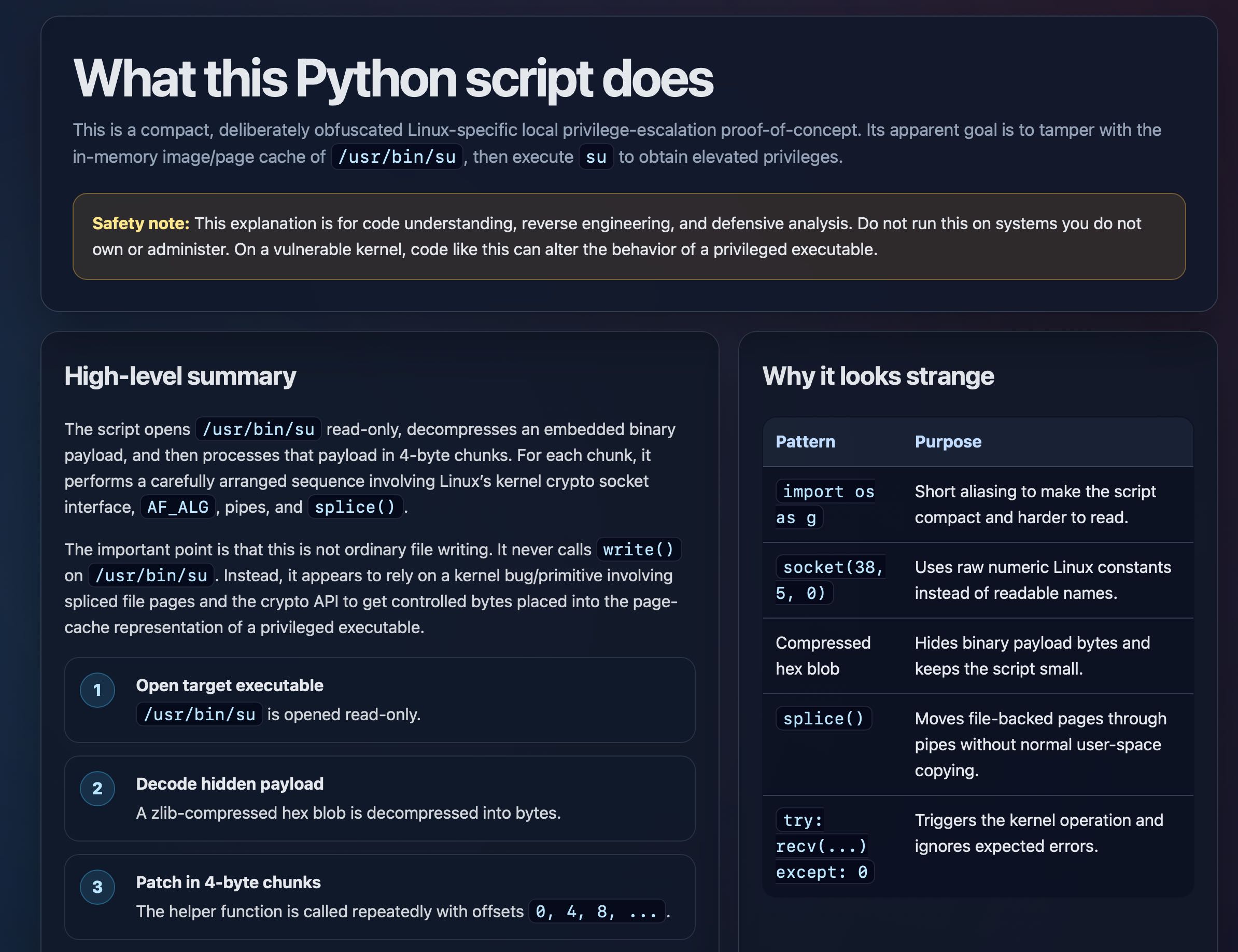
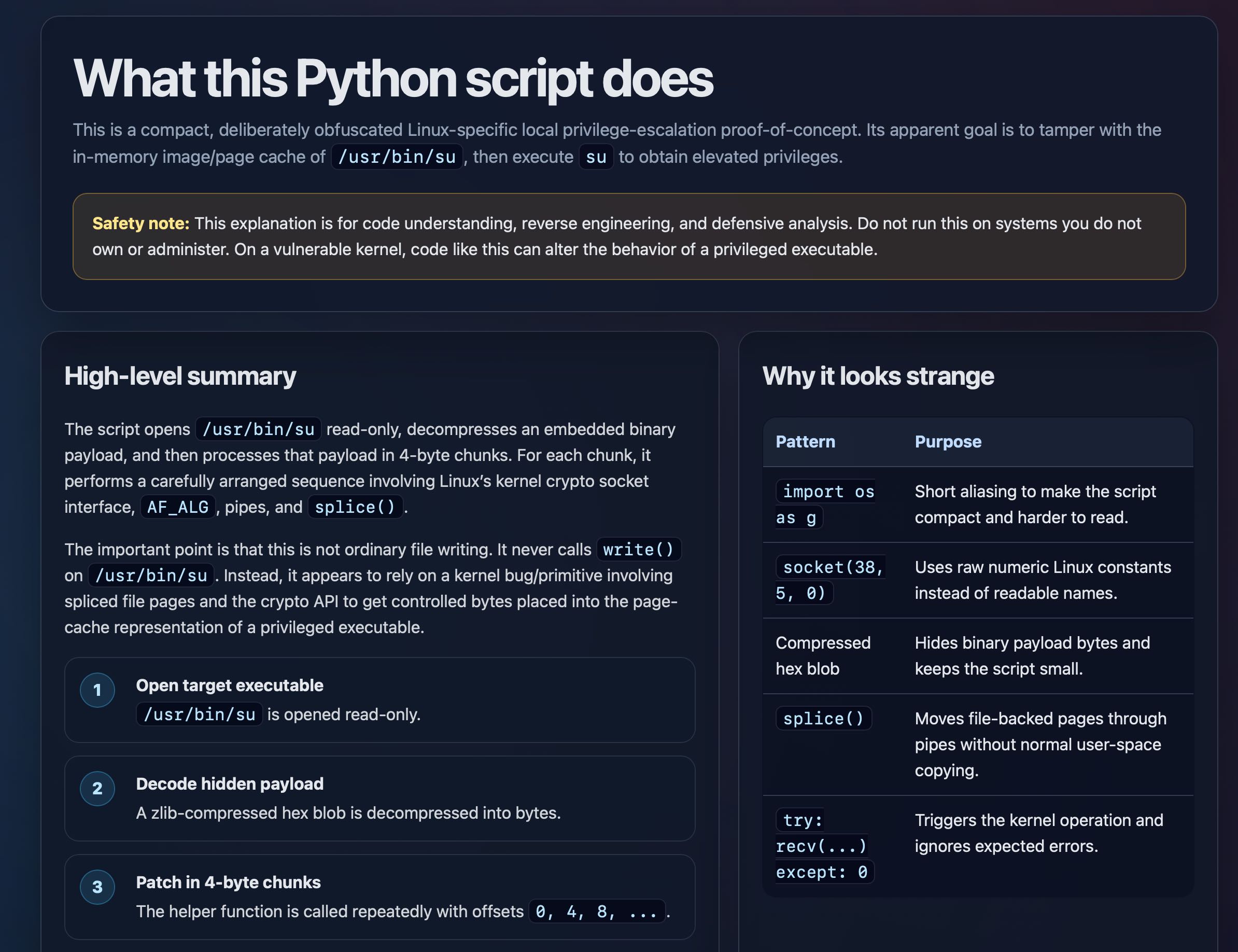
I tried having GPT-5.5 create an HTML explanation of the exploit like this:
curl https://copy.fail/exp | llm -m gpt-5.5 -s 'Explain this code in detail. Reformat it, expand out any confusing bits and go deep into what it does and how it works. Output HTML, neatly styled and using capabilities of HTML and CSS and JavaScript to make the explanation rich and interactive and as clear as possible'
Here's the resulting HTML page. It's pretty good, though I should have emphasized explaining the exploit over the Python harness around it.
Posted 8th May 2026 at 9 pm
Recent articles
- Notes on the xAI/Anthropic data center deal - 7th May 2026
- Live blog: Code w/ Claude 2026 - 6th May 2026
- Vibe coding and agentic engineering are getting closer than I'd like - 6th May 2026
This is a link post by Simon Willison, posted on 8th May 2026.
html 96 security 602 markdown 32 ai 2009 prompt-engineering 190 generative-ai 1780 llms 1746 llm 597 claude-code 112
Monthly briefing
Sponsor me for $10/month and get a curated email digest of the month's most important LLM developments.
Pay me to send you less!
- Disclosures
- Colophon
- ©
- 2002
- 2003
- 2004
- 2005
- 2006
- 2007
- 2008
- 2009
- 2010
- 2011
- 2012
- 2013
- 2014
- 2015
- 2016
- 2017
- 2018
- 2019
- 2020
- 2021
- 2022
- 2023
- 2024
- 2025
- 2026
链接抓取:https://workos.com/?utm_source=simon-willison&utm_medium=newsletter&utm_campaign=q12026
The all-in-one solution
Enterprise SSO
(and a whole lot more)
WorkOS is a set of building blocks for quickly adding enterprise features to your app. You’ll be shipping quickly with a market-proven solution for your customers.
Add Single Sign-On to your app


Auth for all SSO providers
Support any SAML or OIDC identity provider with a single integration

Complete User Management
Manage users and organizations, set policies, and support all auth types

Social authentication
Sign in to your app with Microsoft, Google, and more

AuthKit
Flexible authentication UI powered by WorkOS and Radix

Magic Auth
Passwordless auth with a six-digit code sent via email

Multi-Factor Auth
Developer-first design
A unified platform with modern APIs
WorkOS provides a single, elegant interface that abstracts dozens of enterprise integrations.
RESTful APIs, JSON responses, and normalized objects
Dashboard seamlessly integrates WorkOS into your application
Realtime updates from directory services with webhook events
Modern SDKs for Node.js, Ruby, Python, .NET, Go and more
Multiple environments to map to your application development process
Supports 20+ enterprise services with a single integration point
Node.jsRubyPythonGoPHPJava.NETcURL
// Get a user’s access token and
// profile data from an Identity Provider

import WorkOS from '@workos-inc/node';

const workos = new WorkOS('sk_example_123456789');

const profile = await workos.sso.getProfileAndToken({
  code: '01E2RJ4C05B52KKZ8FSRDAP23J',
  clientID: 'client_123456789',
});

# Get a user’s access token and
# profile data from an Identity Provider

require 'workos'

WorkOS.key = 'sk_example_123456789'

WorkOS::SSO.profile_and_token(
  client_id: 'client_123456789',

import workos
from workos import client

workos.api_key = 'sk_example_123456789'
workos.client_id = 'client_123456789'

client.sso.get_profile_and_token('01E2RJ4C05B52KKZ8FSRDAP23J')

import "github.com/workos/workos-go/pkg/sso"

sso.SetAPIKey("sk_example_123456789")

sso.GetProfileAndToken(
  context.Background(),
  sso.GetProfileAndTokenOptions{
    Code: "01E2RJ4C05B52KKZ8FSRDAP23J",
  }

$this->sso = new WorkOS\SSO();

$profile = $this->sso->getProfileAndToken("01E2RJ4C05B52KKZ8FSRDAP23J");

import com.workos.WorkOS;

WorkOS workos = new WorkOS("sk_example_123456");

ProfileAndToken profileAndToken = workos.sso.getProfileAndToken("01E2RJ4C05B52KKZ8FSRDAP23J", "client_123456789");

Profile profile = profileAndToken.profile;

WorkOS.SetApiKey("sk_example_123456");

var ssoService = new SSOService();
var options = new GetProfileAndTokenOptions
{
    ClientId = "client_123456789",
    Code = "01E2RJ4C05B52KKZ8FSRDAP23J",
};

var profile = await ssoService.GetProfileAndToken(options);

curl --request POST \
  --url "https://api.workos.com/sso/token? \
  client_id=client_123456789& \
  client_secret=sk_example_123456789& \
  grant_type=authorization_code& \
  code=01E2RJ4C05B52KKZ8FSRDAP23J"
HTTP 200
Response {...}
  "access_token": "01DMEK0J53CVMC32CK5SE0KZ8Q",
  "profile": {
    "id": "prof_01DMC79VCBZ0NY2099737PSVF1",
    "connection_id": "conn_01E4ZCR3C56J083X43JQXF3JK5",
    "connection_type": "okta",
    "email": "alan@foo-corp.com",
    "first_name": "Alan",
    "last_name": "Turing",
    "idp_id": "00u1a0ufowBJlzPlk357",
    "object": "profile",
    "raw_attributes": {...}


WorkOS


Directory Sync
SCIM and HRIS integrations? No sweat.
Quickly enable full user lifecycle management by syncing your app with dozens of enterprise employee directory systems.
Add Directory Sync to your app

SCIM provisioning
with Okta, Entra ID, ADFS, and more

HRIS integration
with Bamboo, Rippling, and others
Frictionless set up
The IT admin’s admin
Free your support team from the ongoing headache of configuring SSO for enterprise customers. The Admin Portal is a hosted interface for IT admins to directly set up WorkOS.

Effortlessly connect any identity provider or directory
Customize the look and feel to match your brand
Host on your custom domain (CNAME)
A polished experience for IT administrators
Step-by-step setup guides with detailed screenshots
Seamlessly integrates into your existing application
Why WorkOS?
Expand your market
In the past, building for the enterprise was complex, time-consuming, and distracting from core features. Deals would slip away, perhaps forever, due to requirements from IT admins.
With WorkOS, you can immediately begin selling to enterprise customers and expand your market footprint.
 Watch: Crossing the
Enterprise ChasmWhat happens if you don’t become Enterprise Ready?
Powered by WorkOS

“I think we could have done even more business if we had partnered with WorkOS earlier, it's been incredibly well received.”

Guillermo Rauch
Founder & CEO

“The WorkOS team was right there with us every step of the way. Their support ensured those final migrations were just as smooth as the rest.”

Andreas Djokic
Enterprise GTM

“Cursor now completely runs on WorkOS. Login times are much faster, the signup page looks much better, and we’re not subject to Auth0's customer-hostile and opaque pricing anymore. Plus, we’re excited to add SSO for our business tier soon.”

Arvid Lunnemark
Founder

“SSO is a crucial part of our Enterprise Pro plan, and with WorkOS we could roll it out in less than a week. Docs are comprehensive, the Admin Portal has made customer onboarding a breeze, and the level of support we received directly in Slack has been phenomenal.”

Dmitry Shevelenko
Chief Business Officer

“Integrating was straightforward, pleasant, and fun. The team answered my questions quickly, and went above and beyond to help when I ran into issues.”

Bryant Chou
Co-Founder & CTO

“When I asked the team, how was the experience with WorkOS? They were just like, this is incredible.”

Sam Lambert
CEO

“WorkOS simplified the complexity of implementing single sign-on (SSO) with multiple identity providers.”
.jpeg)
Daniel Marashlian

“With our in-house solution we had to spend 2-4 hours provisioning each SSO connection. I wanted to find a solution that would allow us to focus on building core-products.”

Jarel Fryer
Engineering Manager

“We did consider open source, but WorkOS provided a far superior developer experience.”

Jeanne Thai
Product Manager

“With Audit Logs, we were able to launch the storage, querying, and export capabilities we needed into production in just a matter of days.”

Pete Hamilton

“We viewed WorkOS’ connections-based pricing as a more viable option aligned with our projected growth. The Admin Portal has also been a critical feature allowing us to save engineering time and provide a more polished enterprise experience.”

Umar Azhar
Co-founder & CTO

“WorkOS’ SCIM API has been a game-changer, enabling us to meet the user lifecycle management needs of our largest enterprise customers.”
.jpeg)
Dana Lawson
SVP, Engineering

“The decision to use WorkOS was straightforward. We saw good feedback from existing customers and reviewing the documentation made us confident that our needs would be addressed.”

Chris Lu
Co-founder

“WorkOS was super easy to self serve and get up and running. It provided us super easy-to-implement must-have functionality out of the box.”

Brennan Spellacy
Co-Founder & CEO

“What sold WorkOS was the Admin Portal. Our UI gives customers a link; they go to the Admin Portal, complete onboarding steps at their leisure, and never have to talk to us, making the onboarding process a breeze.”

Chris Pickett
Staff Engineer

“SCIM is a game-changer for our customers, saving them a lot of time and reducin
链接抓取:https://thariqs.github.io/html-effectiveness/
01
Exploration & Planning
3 demos
When you're not sure what you want yet. Ask the agent to fan out across several directions and lay them next to each other so you can point at one — instead of reading three sequential walls of text and trying to hold them all in your head. And once you've picked, turn the pick into a plan the implementer can actually read.
Three code approaches Side-by-side comparison of three ways to solve the same problem, with trade-offs called out inline. 01-exploration-code-approaches.html→ Visual design directions A handful of layout and palette options rendered live so you can react to them, not imagine them. 02-exploration-visual-designs.html→ Implementation plan Milestones on a timeline, a data-flow diagram, inline mockups, the risky code, and a risk table — the plan you hand off. 16-implementation-plan.html→
02
Code Review & Understanding
Diffs and call-graphs are spatial information; markdown flattens them. Let the agent render the change as an annotated diff, draw the module as boxes and arrows, or write the PR description your reviewers actually want — so the shape of the code is visible at a glance.
Annotated pull request A diff rendered with margin notes, severity tags and jump links — easier to scan than scrolling a terminal. 03-code-review-pr.html→ PR writeup for reviewers The author's side: motivation, before/after, a file-by-file tour with the why , and where to focus the review. 17-pr-writeup.html→ Module map An unfamiliar package drawn as boxes and arrows, with the hot path highlighted and entry points listed. 04-code-understanding.html→
03
Design
2 demos
HTML is the medium your design system ships in, so it's the natural format for talking about it. Tokens become swatches, components become contact sheets, and the artifact can be fed straight back into the next prompt.
Living design system Colors, type scale and spacing tokens pulled from a repo and rendered as swatches you can copy from. 05-design-system.html→ Component variants Every size, state and intent of one component laid out on a single sheet for review. 06-component-variants.html→
04
Prototyping
Motion and interaction can't be described, only felt. A throwaway page with the real easing curve or the real click-through tells you in five seconds what a paragraph of prose never could.
Animation sandbox The transition in isolation with sliders for duration and easing, so you can tune it before wiring it in. 07-prototype-animation.html→ Clickable flow Four screens linked together — enough fidelity to feel whether the interaction is right. 08-prototype-interaction.html→
05
Illustrations & Diagrams
Inline SVG gives the agent a real pen. Ask for the figures for a post or a flowchart of a process and get vector art you can tweak by hand or paste straight into the final document.
SVG figure sheet The diagrams for a blog post, drawn inline so they can be tweaked and copied out one by one. 10-svg-illustrations.html→ Annotated flowchart A deploy pipeline drawn as a real flowchart — click any step to see what runs, timings, and failure paths. 13-flowchart-diagram.html→
06
Decks
1 demo
A handful of <section> tags and twenty lines of JS is a slide deck. Point the agent at a Slack thread or a design doc and get something you can arrow-key through in a meeting — no Keynote, no export step.
07
Research & Learning
An explainer with collapsible sections, tabbed code samples and a glossary in the margin reads very differently from the same words dumped linearly. The agent can build the scaffolding that makes a new topic navigable.
How a feature works "Explain rate limiting in this repo" — TL;DR box, collapsible request-path steps, tabbed config snippets, and an FAQ. 14-research-feature-explainer.html→ Concept explainer Consistent hashing taught with a live ring you can add/remove nodes from, a comparison table, and a hover-linked glossary. 15-research-concept-explainer.html→
08
Reports
Recurring documents — status updates, post-mortems — benefit most from a bit of structure and color. A small chart and a colored timeline turn something people skim into something they actually read.
Weekly status What shipped, what slipped, and a small chart — formatted for a quick skim on Monday morning. 11-status-report.html→ Incident timeline A post-mortem with a minute-by-minute timeline, log excerpts and the follow-up checklist. 12-incident-report.html→
09
Custom Editing Interfaces
Sometimes it's hard to describe what you want in a text box. Ask for a throwaway editor for the exact thing you're working on — and always end with an export button that turns whatever you did in the UI back into something you can paste into the agent or commit. You stay in the loop; the loop gets tighter.
Ticket triage board Drag thirty tickets across Now / Next / Later / Cut, then copy the final ordering out as markdown. 18-editor-triage-board.html→ Feature flag editor Toggles grouped by area, dependency warnings when a prerequisite is off, and a "copy diff" button for just the changed keys. 19-editor-feature-flags.html→ Prompt tuner Editable template on the left with variable slots highlighted; three sample inputs on the right re-render live as you type. 20-editor-prompt-tuner.html→